Clear audio is one of the most important parts of any successful meeting, classroom lesson, presentation, or live event. Unfortunately, it is also one of the easiest parts of an AV system to get wrong.
A display can look sharp. A camera can frame the room perfectly. The control panel can be simple to use. But if people cannot hear the presenter, teacher, remote participant, or audience member clearly, the entire experience suffers.
Microphone performance depends on much more than buying a quality mic. The type of microphone, where it is placed, how the room sounds, and how the system is integrated all affect the final result. For organizations planning a new room or upgrading an existing space, avoiding these common microphone mistakes can make the difference between reliable communication and constant frustration.
Mistake #1: Choosing the Wrong Microphone for the Room
Not every microphone is right for every space. A small huddle room, a large boardroom, a lecture hall, a training classroom, and a hotel ballroom all have different audio needs.
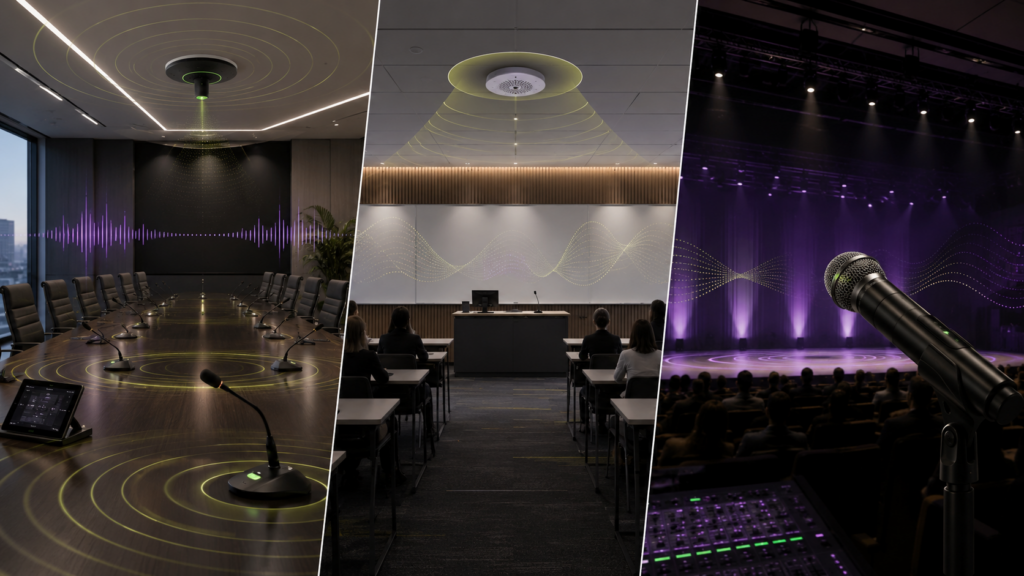
Ceiling microphones can be a strong choice when the goal is a clean table surface, flexible furniture layout, or broad room coverage. They are often used in conference rooms, classrooms, and multipurpose spaces where people may sit or move in different areas.
Table microphones work well when speakers are seated in predictable positions. They can provide close voice pickup and are often a good fit for boardrooms, conference rooms, and council-style spaces.
Wireless microphones are useful when presenters need to move, instructors teach from different parts of the room, or audience participation is required. Handheld, lavalier, and headset options each serve a different purpose.
The mistake is assuming one microphone style can solve every problem. A better approach is to design the microphone system around how the room is actually used. For example, a corporate boardroom may need ceiling array microphones for video conferencing, while a training space may need a combination of instructor wireless mics and audience pickup.
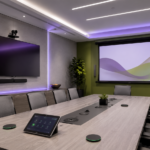
For organizations planning meeting spaces, CCS provides AV design and integration support for conference and board rooms where audio, video, control, and collaboration systems need to work together.
Mistake #2: Placing Microphones Too Far from the Person Speaking
Distance matters. The farther a microphone is from the speaker, the more it picks up room noise, HVAC sound, keyboard clicks, paper shuffling, and reflections from walls, floors, and ceilings.
This is one of the most common reasons people on the far end of a video call say, “Can you repeat that?” or “You sound far away.”
Good microphone placement should account for:
- Where people sit or stand
- Whether speakers move during the session
- Ceiling height
- Table size and shape
- Room noise
- Camera framing and furniture layout
- Loudspeaker placement
A ceiling mic in the wrong spot can miss important voices. A table mic placed too far from participants can sound thin and distant. A wireless lavalier worn too low or covered by clothing can become muffled.
Microphones should be positioned based on voice pickup patterns, not just what looks convenient.
Mistake #3: Ignoring Room Acoustics
Even the best microphone can struggle in a bad-sounding room.
Hard walls, glass, tile, exposed ceilings, and large open surfaces can create echo and reverberation. In classrooms, this can make teachers harder to understand. In conference rooms, it can make remote participants hear a hollow or “boomy” sound. In event spaces, poor acoustics can cause feedback, muddy speech, and listener fatigue.
Common acoustic problems include:
- Too many reflective surfaces
- High ceilings without acoustic treatment
- Glass walls or partitions
- Large open rooms with minimal soft surfaces
- HVAC noise near microphones
- Loudspeakers aimed toward microphone pickup zones
Room acoustics should be considered early in the AV planning process. Acoustic panels, ceiling treatments, carpeting, curtains, and proper speaker placement can all improve speech clarity.
This is especially important in schools, corporate meeting rooms, houses of worship, and hospitality spaces where speech intelligibility directly affects participation and engagement.
Mistake #4: Using Wireless Microphones Without a Frequency Plan
Wireless microphones offer flexibility, but they are not “plug and play” in every environment. Without proper planning, wireless systems can suffer from interference, dropouts, static, and inconsistent audio.
Wireless microphone issues may be caused by:
- Competing wireless systems
- Improper frequency coordination
- Low battery management
- Poor antenna placement
- Too many wireless devices in one space
- Physical obstructions
- Inadequate system testing before use
This is especially important for event venues, schools, boardrooms, government facilities, and houses of worship that use multiple wireless microphones at the same time.
A professional AV integrator can help select the right wireless system, coordinate frequencies, position antennas, and train users on proper operation.
Mistake #5: Forgetting About the People Joining Remotely
A microphone system may sound acceptable inside the room but still perform poorly for remote participants. This is a major problem in hybrid meetings and hybrid classrooms.
Remote participants depend entirely on the room’s microphone system. If the system only captures the loudest person in the room, remote attendees may miss side conversations, student questions, or comments from people seated at the far end of the table.
A strong hybrid audio setup should capture voices clearly across the room while minimizing background noise and echo. This may require ceiling array microphones, multiple table microphones, DSP processing, echo cancellation, and careful integration with video conferencing platforms.
CCS supports organizations with cloud conferencing solutions designed to connect people more clearly across meeting rooms, classrooms, and remote locations.
Mistake #6: Letting Microphones and Speakers Fight Each Other
Feedback happens when microphones pick up sound from loudspeakers and send it back through the system in a loop. This creates the familiar squeal or ringing sound that can quickly disrupt a meeting, class, or event.
Feedback is often caused by:
- Microphones placed too close to speakers
- Speakers aimed toward microphone pickup areas
- Excessive microphone gain
- Poor room acoustics
- Presenters standing in the wrong location
- Incorrect system tuning
The solution is not always “turn the mic down.” A properly designed system considers microphone pickup patterns, loudspeaker coverage, DSP settings, room layout, and user behavior.
This is one reason professional AV integration matters. Audio components need to be designed as a complete system, not as separate pieces of equipment.
Mistake #7: Overlooking User Training
Many microphone problems are not caused by equipment failure. They happen because users do not know how to operate the system correctly.
A presenter may hold a handheld mic too far away. A teacher may forget to charge a wireless microphone. A meeting host may mute the wrong input. A staff member may move a table mic out of its intended position.
Basic training can prevent many day-to-day audio issues. Users should understand:
- Which microphone to use
- How close to speak into it
- How to mute and unmute properly
- How to charge or replace batteries
- Where microphones should be placed
- Who to contact when something does not sound right
CCS provides full-service AV support, including design, engineering, installation, training, and ongoing service. Learn more about CCS audio visual integration services.
Mistake #8: Designing for Today but Not Tomorrow
Rooms change. Teams grow. Classroom formats evolve. Events become hybrid. Furniture gets rearranged. A microphone system that works for one layout may not work when the room is used differently.
Before choosing microphones, consider how the space may be used in the future:
- Will tables be reconfigured?
- Will meetings include remote participants?
- Will instructors move around the room?
- Will audiences ask questions?
- Will events require multiple presenters?
- Will the room support different departments or outside groups?
Flexible AV design helps protect the investment. Ceiling microphones, scalable DSP systems, wireless options, and properly planned infrastructure can make it easier to adapt as needs change.
Organizations with offices or facilities outside the Southwest can also connect with regional CCS teams, including CCS Mid Atlantic and CCS Midwest, for AV integration support in their areas.
How to Get Microphone Design Right
The best microphone setup starts with the room, not the product list.
Before installing microphones, an AV team should evaluate:
- Room size and layout
- Ceiling height and materials
- Furniture placement
- Wall, floor, and ceiling surfaces
- Use cases for meetings, teaching, and events
- In-room and remote participants
- Existing speakers, displays, cameras, and control systems
- Network and conferencing platform requirements
A successful system should make communication feel natural. People should not have to lean forward, repeat themselves, pass microphones awkwardly, or wonder whether the far end can hear them.
Better Audio Starts with Better Planning
Microphones are small pieces of technology with a big impact. When they are chosen, placed, and tuned correctly, meetings run smoother, students hear more clearly, presenters sound more professional, and remote participants stay engaged.
When they are handled incorrectly, the results are immediate: poor sound, missed information, frustrated users, and rooms that do not get used to their full potential.
Whether you are upgrading a conference room, building a new classroom, improving a training space, or preparing an event venue, CCS can help design an audio solution that fits the room and the people using it.
Ready to improve the sound in your meeting rooms, classrooms, or event spaces?
Contact CCS Presentation Systems to plan a microphone and AV system that supports clear communication from every seat in the room.