Classroom technology has changed quickly over the past decade. Teachers are no longer using displays only to show slides or videos. Today’s classrooms often need collaboration tools, touch interaction, wireless sharing, video conferencing, digital annotation, and flexible support for in-person, hybrid, and small-group learning.
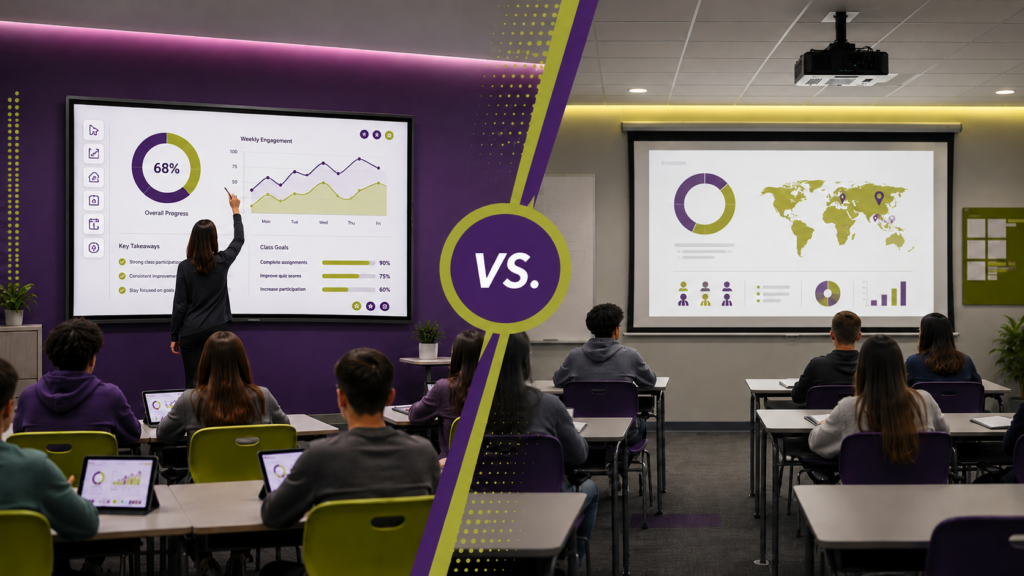
That shift has created an important question for schools and universities: Should classrooms use interactive displays or projectors?
The answer depends on the room, the teaching style, the budget, and the long-term technology plan. Both solutions can work well, but they solve different problems. Understanding the strengths and limitations of each option can help education leaders make smarter AV investments.
What Is an Interactive Display?
An interactive display is a large touchscreen panel designed for teaching, presenting, annotation, and collaboration. In many classrooms, interactive displays have replaced traditional whiteboards, older SMART Boards, and basic flat panels.
Modern interactive displays often support digital whiteboarding, screen sharing, touch input, built-in apps, and connection to teacher or student devices. These tools fit naturally into broader classroom technology plans that may also include audio systems, conferencing tools, document cameras, digital signage, and classroom control systems.
For teachers, the biggest benefit is direct engagement. Instead of standing at a laptop or lectern, instructors can write, draw, move content, save notes, and bring students into the lesson from the front of the room.
Learn more about CCS Projects’ education-focused AV solutions here: K-12 & Higher Education.
What Is a Classroom Projector?
A classroom projector displays content onto a projection screen, wall, or interactive surface. Projectors have been used in education for decades because they can create large images at a relatively low cost per inch.
Projectors are still a strong fit for large classrooms, lecture halls, auditoriums, and rooms where students need to see content from farther away. A properly selected projector can support high brightness, strong image clarity, and large-format viewing for a wide range of educational environments.
Projectors are especially useful when the priority is image size. A 100-inch or 120-inch projected image may be more practical than installing a very large interactive flat panel in certain rooms.
CCS Projects also provides support for projection systems and screens for classrooms, auditoriums, conference rooms, and other presentation spaces.
Visibility and Image Quality
Interactive displays typically offer bright, sharp images that are easy to see in rooms with normal lighting. Because the image comes directly from the screen, there is no projector beam, no shadowing, and less concern about washed-out content from sunlight or overhead lights.
Projectors can also deliver excellent image quality, but performance depends heavily on the projector brightness, screen material, ambient light, throw distance, and installation quality. In a dim lecture hall, a projector may look great. In a bright classroom with large windows, a poorly matched projector may struggle.
For standard classrooms, interactive displays often win on consistency. For larger rooms, projectors may still make more sense because they can scale to a bigger image.
Interactivity and Student Engagement
This is where interactive displays stand out.
Teachers can annotate directly over lessons, save whiteboard sessions, manipulate visual content, and invite students to interact with the display. This supports active learning, group work, and more dynamic instruction.
Projectors can support interactivity too, but they often require additional hardware, interactive pens, special boards, cameras, or software. That can make the system more complex to maintain and use.
If the goal is frequent hands-on interaction, an interactive display is usually the more straightforward choice. CCS Projects has a dedicated Interactive Displays service page covering touchscreen display design and installation for educational and commercial environments.
Room Size and Layout
Room size is one of the biggest deciding factors.
For small to midsize classrooms, interactive displays often make sense because they provide strong visibility, built-in touch functionality, and a clean installation. They are especially useful in elementary classrooms, small seminar rooms, training rooms, and flexible learning spaces.
For large classrooms, lecture halls, auditoriums, and multipurpose spaces, projectors may still be the better option. A projected image can be much larger, making it easier for students in the back of the room to see detailed content.
In some cases, the best answer is not one or the other. A lecture hall might use a projector for large-format viewing and an interactive display or annotation monitor for instructor control.
Maintenance and Long-Term Support
Interactive displays usually have fewer moving parts than traditional projection systems. There are no lamps to replace in most modern flat panels, no projector filters to clean, and no alignment issues caused by bumped equipment. That can reduce routine maintenance.
Projectors, however, have improved significantly. Laser projectors can offer long life, high brightness, and reduced maintenance compared to older lamp-based models. They still require careful installation and periodic support, but they remain a practical choice for many education environments.
Schools should also think about who will support the technology. If teachers frequently need IT help to turn on the system, connect devices, or troubleshoot image issues, the room design may need to be simplified.
CCS Projects’ AV integration services focus on coordinating displays, projectors, audio, control panels, conferencing software, and other AV components into a functioning solution.
Budget Considerations
Projectors can be cost-effective when a school needs a very large image. The cost per screen inch is often lower than a large interactive display, especially in auditoriums and lecture halls.
Interactive displays may cost more upfront than a basic projector setup, but they can offer more built-in value. Touch interaction, annotation, wireless sharing, onboard tools, and reduced maintenance can make them a better long-term investment for many classrooms.
The right comparison should include more than purchase price. Schools should consider installation, cabling, control systems, training, maintenance, replacement cycles, and how often the technology will actually be used.
Quick Comparison: Interactive Displays vs. Projectors
| Factor | Interactive Displays | Projectors |
|---|---|---|
| Best For | Small to midsize classrooms, collaboration, touch-based learning | Large classrooms, lecture halls, auditoriums, oversized images |
| Image Quality | Bright, sharp, consistent in normal lighting | Depends on brightness, screen, lighting, and room conditions |
| Interactivity | Built-in touch, annotation, whiteboarding, and collaboration | Possible with added hardware or interactive projection tools |
| Maintenance | Generally lower maintenance with fewer moving parts | Laser models reduce maintenance, but setup and alignment still matter |
| Scalability | Limited by available display sizes and budget | Excellent for very large images and larger rooms |
Which Option Makes More Sense?
For many modern classrooms, interactive displays are the better fit when the room is small to midsize, teachers want touch-based instruction, and collaboration is a priority.
Projectors make more sense when the room is large, the image needs to be oversized, or the space is designed primarily for lecture-style presentations.
A school district may use both. Interactive displays might be installed in standard classrooms, while projectors remain the better choice for lecture halls, auditoriums, cafeterias, and multipurpose rooms.
Regional CCS teams also support education technology projects across different markets. For example, CCS Colorado’s education team works with institutions on classroom AV and interactive learning environments, while CCS Michigan supports organizations with interactive technology, cloud-based conferencing, and audio-visual solutions.
Final Recommendation
The best classroom display choice is the one that supports how teachers teach and how students learn.
Choose an interactive display when engagement, touch, annotation, and everyday ease of use matter most. Choose a projector when image size, room scale, and presentation visibility are the top priorities. For many schools, the smartest approach is a blended AV standard that uses each technology where it performs best.
CCS Projects can help schools evaluate classroom layouts, teaching goals, infrastructure, budget, and long-term support needs to determine whether interactive displays, projectors, or a combination of both will deliver the best result.
Ready to upgrade your classroom technology? Contact CCS Projects to plan an AV solution that supports clearer instruction, stronger engagement, and better learning experiences.