Conference rooms have become some of the most important communication spaces in the workplace. They are used for client presentations, team meetings, video calls, training sessions, executive discussions, hybrid collaboration, and everyday decision-making. When the technology in these rooms is outdated, hard to use, or unreliable, meetings can quickly become frustrating.
Upgrading conference room technology can make meetings smoother, communication clearer, and collaboration easier. But a successful upgrade requires more than choosing a new display or adding a camera. Room size, display placement, camera location, microphone coverage, lighting, cable management, control panels, hybrid meeting needs, and long-term support all need to be considered.
At CCS Presentation Systems, our team helps organizations design and install conference room AV systems that are built around the way each space is actually used. Whether you are updating one room or planning upgrades across multiple locations, CCS can help create a solution that is practical, reliable, and easy to use.
Start with How the Room Is Used
Before selecting equipment, it is important to understand the purpose of the room. A small huddle room used for quick video calls does not need the same technology as a large boardroom used for executive presentations. A training room may need different tools than a client-facing conference space.
Think about how people use the room day to day. Do users mostly present from laptops? Are remote participants included often? Does the room need to support video conferencing, wireless sharing, training, or interactive collaboration? How many people usually attend meetings in the space?
These questions help guide the AV design so the final system supports the real needs of the room instead of adding technology that does not fit.
Choose the Right Display Setup
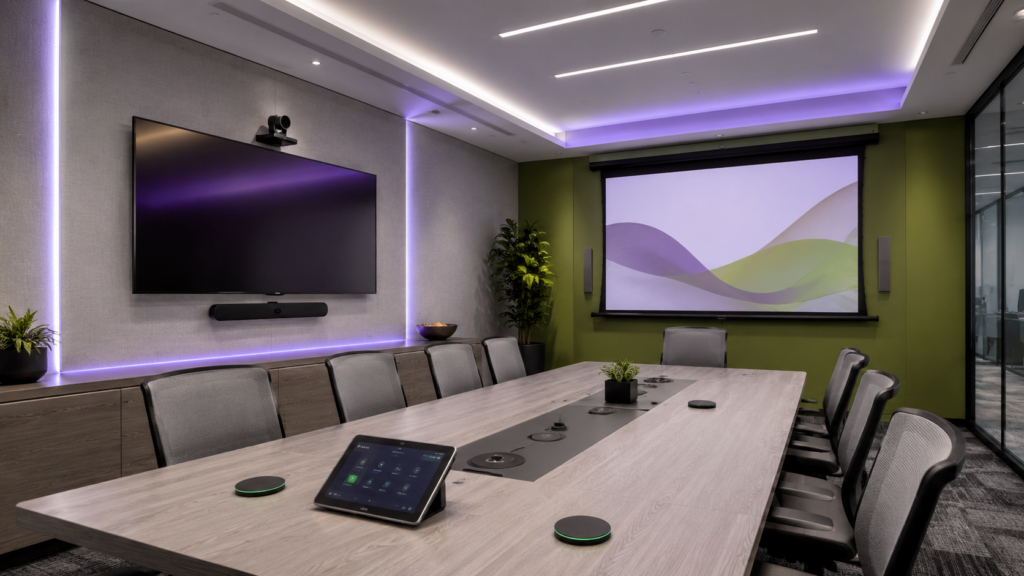
The display is often the center of the conference room experience. It may be used for presentations, video calls, shared documents, dashboards, training materials, or digital whiteboarding. If the display is too small, too high, too dim, or poorly placed, users may struggle to see content clearly.
Professional display solutions from brands like LG and Sharp can support meeting rooms, boardrooms, training spaces, and collaboration areas. The right display setup depends on room size, viewing distance, seating layout, lighting, and content type.
Some rooms may only need one wall-mounted display. Larger rooms may benefit from dual displays so remote participants and shared content can be shown at the same time. Training rooms or larger presentation spaces may require projection instead. In those cases, Epson projection solutions can help support larger-format visuals.
Plan Camera Placement Carefully
Video conferencing is now a major part of modern meeting rooms. Camera placement affects how remote participants experience the room. A camera mounted too high, too far away, or at the wrong angle can make the meeting feel disconnected.
The camera should provide a clear view of the people in the room while supporting natural conversation. For smaller rooms, a camera bar may be enough. Larger boardrooms may need a PTZ camera or multiple camera angles. Training rooms may need a camera that can capture both the presenter and the audience.
The goal is to help remote participants feel included instead of simply watching from the outside.
Make Audio a Priority
Audio is one of the most important parts of any conference room upgrade. If people cannot hear clearly, the meeting experience breaks down quickly. Poor microphone pickup, echo, background noise, and uneven speaker coverage can all make meetings harder to follow.
Professional audio solutions from Shure can help support clearer communication in conference rooms, classrooms, training spaces, and hybrid meeting environments. Depending on the room, the best solution may include tabletop microphones, ceiling microphones, wireless microphones, speakers, and audio processing.
Microphone coverage should match the seating layout. Speakers should be placed so remote voices are heard clearly. The room’s acoustics should also be considered, especially in spaces with glass walls, hard surfaces, or high ceilings.
Consider Lighting and Room Layout
Lighting can affect both in-room visibility and video conferencing quality. A room that is too dark may make video calls look poor. Bright windows or uneven lighting can create glare on displays or make participants harder to see on camera.
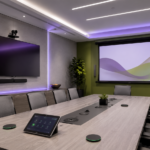
Room layout also matters. The shape of the table, seating position, display location, camera angle, and microphone placement all affect the user experience. A conference room should be designed so people can see the screen, hear clearly, face the camera naturally, and participate comfortably.
Professional AV design looks at the whole room, not just the equipment list.
Keep Cable Management Clean
Cable management and connectivity are easy to overlook, but they are essential for a reliable conference room. Users may need to connect laptops, share content, plug into USB-C, use HDMI, access network ports, or connect to table boxes and wall plates.
Connectivity products from Covid can support professional AV installations with cables, panels, connectors, adapters, extenders, and signal management products. Clean infrastructure helps reduce clutter, improve reliability, and make the room easier to maintain.
A well-planned room should have connection points where users need them, with cable paths that are organized and serviceable.
Make the Room Easy to Control
A conference room should not require a technical expert to operate. Users should be able to walk in, turn on the display, start a video call, adjust volume, share content, and manage the room without confusion.
Control panels and room interfaces can help simplify the experience. Instead of managing multiple remotes, devices, and cables, users can control the room from one simple interface. This can reduce meeting delays and make the room more approachable for everyone.
Through our AV integration services, CCS helps organizations design systems that are powerful behind the scenes but simple for everyday users.
Think About Long-Term Support
A conference room upgrade should be built for long-term use. That means thinking about serviceability, equipment access, user training, documentation, future expansion, and support.
A clean installation with organized cabling, accessible equipment, and properly selected technology is easier to maintain over time. It also helps organizations adapt as meeting needs change.
Through our AV solutions, CCS helps organizations plan systems that support current needs while preparing for future improvements.
Upgrade Your Conference Room with CCS
Upgrading conference room technology can improve meetings, presentations, training, hybrid collaboration, and daily communication. The best results come from planning the full room experience, including displays, cameras, microphones, speakers, lighting, cable management, controls, and support.
CCS works with corporate offices, schools, healthcare facilities, government organizations, hospitality spaces, houses of worship, and other professional environments to design AV systems that are practical, polished, and reliable.
Ready to improve your meeting spaces? Visit CCS Presentation Systems or contact CCS to start planning your next conference room technology upgrade.